Close Menu

    Subscribe to our Newsletter

    Stay updated with all the latest and important news, articles, and deals in the Tech industry.

    What's Hot
    OpenAI strikes major deal with News Corp to boost ChatGPT

    OpenAI strikes major deal with News Corp to boost ChatGPT

    May 23, 2024
    How to Run Apps as Administrator on Windows 11 (All Methods)

    How to Run Apps as Administrator on Windows 11 (All Methods)

    March 20, 2024
    Report: New anti-glare and scratch-resistant display coming to iPhone 17

    Report: New anti-glare and scratch-resistant display coming to iPhone 17

    March 19, 2024
    Facebook X (Twitter) Instagram
    Facebook X (Twitter) Instagram Pinterest Vimeo
    Techie Talks: Where Technology Meets SimplicityTechie Talks: Where Technology Meets Simplicity
    • Home
    • News
    • Computing
      1. Peripherals & Accessories
      2. Monitors
      3. Internet
      4. Online Security
      5. View All
      Do You Really Need a 4K Monitor?

      Do You Really Need a 4K Monitor? Understanding the Benefits and Overkill

      February 16, 2024
      Do You Really Need a 4K Monitor?

      Do You Really Need a 4K Monitor? Understanding the Benefits and Overkill

      February 16, 2024
      How to Hide Microsoft Edge Sidebar

      How to Hide Microsoft Edge Sidebar in the Latest Update

      February 26, 2024
      DuckDuckGo Browser Takes a Massive Step with End-to-End Encrypted Sync

      DuckDuckGo Browser Takes a Massive Step with End-to-End Encrypted Sync

      February 15, 2024
      DuckDuckGo Browser Takes a Massive Step with End-to-End Encrypted Sync

      DuckDuckGo Browser Takes a Massive Step with End-to-End Encrypted Sync

      February 15, 2024
      How to Run Apps as Administrator on Windows 11 (All Methods)

      How to Run Apps as Administrator on Windows 11 (All Methods)

      March 20, 2024
      How to change your default browser in Windows 11

      How to change your default browser in Windows 11

      March 12, 2024
      Is Your Mac Safe? How to Detect and Remove Viruses Quickly

      Is Your Mac Safe? How to Detect and Remove Viruses Quickly

      March 7, 2024
      Enable Two Finger Scroll on Windows

      Enable Two Finger Scroll on Windows: Easy Step-by-Step Guide

      March 5, 2024
    • Mobile
      1. Guides
      2. View All
      How to Fix Instagram Crashing in 2024 (11 Methods)

      How to Fix Instagram Crashing in 2024 (11 Methods)

      March 12, 2024
      How to Automatically Delete OTP & Verification Codes on iPhone

      How to Automatically Delete OTP & Verification Codes on iPhone

      March 11, 2024
      Apple Weather App Not Working On iPhone

      9 Ways to Fix Apple Weather App Not Working On iPhone

      March 1, 2024
      Connect to a WiFi Hotspot Without Password

      6 Ways to Connect to a WiFi Hotspot Without Password

      March 1, 2024
      How to Fix Instagram Crashing in 2024 (11 Methods)

      How to Fix Instagram Crashing in 2024 (11 Methods)

      March 12, 2024
      How to Automatically Delete OTP & Verification Codes on iPhone

      How to Automatically Delete OTP & Verification Codes on iPhone

      March 11, 2024
      Does Your Snap Score Increase With Chats

      Does Your Snap Score Increase With Chats? (Explained)

      March 1, 2024
      Apple Weather App Not Working On iPhone

      9 Ways to Fix Apple Weather App Not Working On iPhone

      March 1, 2024
    • Gaming
      1. Gaming Periperals
      2. View All
      Best 4K Monitors for Gaming

      Best 4K Monitors for Gaming in 2024: Top Picks for High-Resolution Play

      February 17, 2024
      How to sync a PS4 controller to pair it with a console or device

      How to sync a PS4 controller to pair it with a console or device

      March 13, 2024
      How to Play Fortnite on iPhone

      How to Play Fortnite on iPhone and iOS: The Ultimate Guide

      March 6, 2024
      How to Download Fortnite

      How to Download Fortnite: Creating and Managing Your Fortnite Account

      March 6, 2024
      Connect AirPods Xbox Series X

      Connect AirPods Xbox Series X: Seamless Audio Pairing Guide

      February 27, 2024
    • Entertainment
      1. Audio / Video
      2. View All
      F1 live stream: How to watch Formula 1 online for free

      F1 live stream: How to watch Formula 1 online for free

      March 8, 2024
      Best IPTV Players for Firestick/Android TV

      10 Best IPTV Players for Firestick/Android TV in 2024: Top Picks Revealed

      March 2, 2024
    • How Tos
      Spotify Error Code 18

      Effortless Solutions to Fix Spotify Error Code 18: Troubleshoot & Stream Uninterrupted!

      March 6, 2024
      How to Play Fortnite on Chromebook

      How to Play Fortnite on Chromebook: Step-by-Step Guide

      February 27, 2024
      How to Increase Keep2Share Download Speed Using VPN

      How to Increase Keep2Share Download Speed Using VPN: Optimize Your Files Transfer Now

      February 27, 2024
      How to Hide Microsoft Edge Sidebar

      How to Hide Microsoft Edge Sidebar in the Latest Update

      February 26, 2024
      How to Fix Services.msc

      Struggling with Services.msc in 2024? Fix it FAST with this Step-by-Step Guide!

      February 22, 2024
    Subscribe
    Techie Talks: Where Technology Meets SimplicityTechie Talks: Where Technology Meets Simplicity
    Home»Computing»Reviews»Asus ROG Zephyrus G14 Review: Best Gaming Laptop 2024?

    Techie Talks may earn a commission when you buy through links on our site.

    Reviews

    Asus ROG Zephyrus G14 Review: Best Gaming Laptop 2024?

    Power Unleashed: An In-Depth Analysis of the Asus ROG Zephyrus G14's Performance, Portability, and Gaming Prowess in 2024
    Elena RiveraBy Elena RiveraFebruary 26, 2024Updated:March 1, 2024No Comments9 Mins Read
    Share Facebook Twitter Pinterest LinkedIn Tumblr Reddit Telegram Email
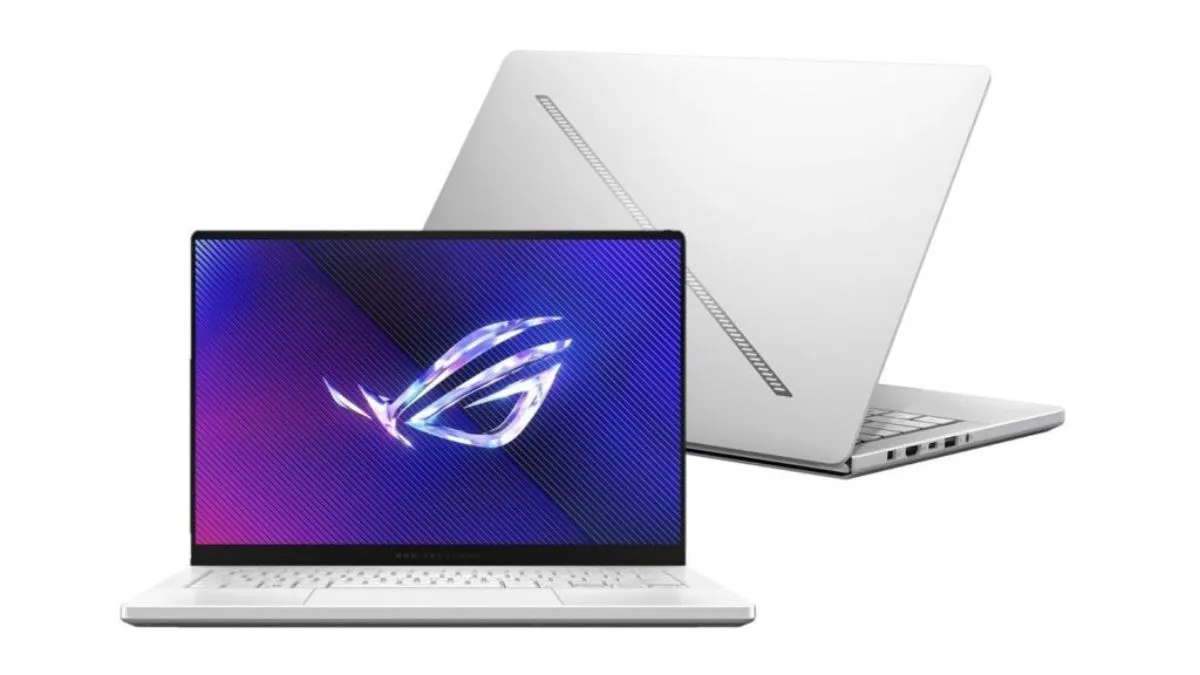
    Asus ROG Zephyrus G14 Review
    (Image credit: Asus)
    Share
    Facebook Twitter LinkedIn Pinterest Email

    Asus ROG Zephyrus G14 (2024)

    The ROG Zephyrus G14 (2024) reaches a pinnacle of excellence unmatched by any other gaming laptop.

    Pros

    • Compact and lightweight design
    • High-quality 3K OLED display
    • USB-C power delivery
    • Impressive performance for its size
    • Portable and sleek design

    Cons

    • Battery life when gaming could be better
    • Some fan noise during intensive tasks
    • Soldered RAM
    • Limited customization options

    Check Amazon

    Are you searching for a top-notch gaming laptop that’s both sleek and powerful? Here is our ASUS ROG Zephyrus G14 review, specifically the variant with an AMD Ryzen 9 8945HS processor, may be just what you’re looking for. It provides an impressive gaming experience without compromising its portability.

    The Zephyrus G14 features a 14-inch 3K (2880×1800) 120Hz OLED ROG Nebula Display that delivers stunning visuals and quick response times. The slim and lightweight design ensures easy transportability, while the NVIDIA GeForce RTX 4060 graphics card with 8GB GDDR6 ensures top-notch performance in heavy-lifting gaming and creative tasks.

    With 16GB of LPDDR5X-6400 RAM and a 1TB PCIe 4.0 NVMe SSD, this gaming laptop ensures smooth operation and ample storage for your files. Reliable Wi-Fi 6E support and plenty of connectivity options, including USB-C with DisplayPort and power delivery, HDMI 2.1, and a Micro SD Card Reader, enhance the overall convenience.

    One thing to note is the laptop’s single-zone RGB backlit keyboard, which may lack the customization options that some gamers prefer. However, the overall balance of performance and portability makes this laptop popular for gaming enthusiasts.

    Contents
     [show]
    • Asus ROG Zephyrus G14 (2024)
      • Bottom Line
    • Overview: ASUS ROG Zephyrus G14 Review
      • Specifications Table
    • Spectacular OLED Display
    • Impressive AMD Ryzen 9 Performance
    • Revolutionary RTX 4060 Graphics
    • Generous Memory and Storage
    • Design and Build Quality
    • Customer Reviews
    • Conclusion

    Bottom Line

    The ASUS ROG Zephyrus G14 is an excellent choice for gamers seeking a high-performance, portable machine.

    Boasting an impressive display, powerful processor, and ample storage, this laptop has everything you need for a top-notch gaming experience.

    Check Amazon

    Overview: ASUS ROG Zephyrus G14 Review

    The revamped ASUS ROG Zephyrus G14 is a gaming laptop that boasts a powerful AMD Ryzen 9 8945HS processor paired with NVIDIA GeForce RTX 4060 graphics. With its 14″ 3K OLED ROG Nebula Display, it offers incredible visuals for gamers and creators alike. This laptop comes with 16GB of LPDDR5X-6400 memory and a 1TB PCIe 4.0 NVMe SSD, ensuring both speed and ample storage capacity.

    Based on our analysis, we found the ASUS ROG Zephyrus G14 to be a reliable and powerful gaming device with an impressive display. However, users should be aware of its limitations, such as the lack of a webcam and restricted RAM upgrade options. Overall, it offers a great balance of performance and portability for gaming enthusiasts and content creators.

    Specifications Table

    SpecificationDetail
    Dimensions12.24 x 8.88 x 0.64 inches
    Weight3.31 pounds
    ProcessorAMD Ryzen 9 8945HS
    GraphicsNvidia RTX 4070 (90W TGP)
    RAM32GB LPDDR5X-6400 (soldered)
    Display3K OLED, 120Hz, G-Sync
    Storage1TB PCIe 4.0 NVMe SSD
    PortsUSB, HDMI, Type-C, microSD
    WirelessBluetooth 5.3, Wi-Fi 6E
    Webcam1080p w/ Windows Hello
    Operating SystemWindows 11 Pro
    Battery73WHrs
    Where to Buy:ASUS ROG Zephyrus G14 2024

    Now that we’ve covered the key specifications of the ASUS ROG Zephyrus G14 GA403, it’s clear that its performance and lightweight design make it a strong contender in the gaming laptop market. The stunning 3K OLED display will undoubtedly impress many, while the powerful AMD Ryzen 9 processor and NVIDIA RTX 4070 graphics will handle even the most demanding games.

    Despite its many great features, there are a few drawbacks to take note of. The RAM is soldered and non-upgradeable, which may hinder future performance upgrades. Additionally, the port selection could be more versatile for those looking to connect various peripherals.

    Spectacular OLED Display

    The OLED display on the Zephyrus G14 truly stands out. Boasting a 14″ 3K (2880×1800) 120Hz 0.2ms OLED screen, it offers vibrant colors, deep blacks, and excellent viewing angles. The 100% DCI-P3 color gamut ensures accurate colors, making it ideal for both gaming and creative work. However, some users may find the 120Hz refresh rate a bit lower compared to other gaming laptops in the market. Despite the minor downside, we believe the overall quality of the display certainly outweighs the refresh rate concern.

    Impressive AMD Ryzen 9 Performance

    When it comes to gaming laptops, performance is key. The ASUS ROG Zephyrus G14 GA403UV-G14.R94060, equipped with an AMD Ryzen 9 8945HS processor, truly stands out in this aspect. We found the processor’s efficiency remarkable, as it effortlessly handles demanding games and multitasking while keeping the device cool and quiet.

    Thanks to the NVIDIA GeForce RTX 4060 graphics card, the visuals delivered by this laptop are nothing short of stunning. The 14″ 120Hz OLED display provides smooth gameplay and vibrant colors, elevating your gaming experience.

    That being said, no product is perfect. Some users might find the 16GB RAM sufficient, while others may desire an upgrade for more intensive tasks. Additionally, the 3.31-pound weight may not be ideal for those who prioritize portability.

    Check Amazon

    Revolutionary RTX 4060 Graphics

    When it comes to gaming laptops, we know that graphics cards play a crucial role in delivering a top-notch gaming experience. Well, the G14 sports the incredible NVIDIA GeForce RTX 4060 8GB GDDR6 graphics card, making it a game-changer in the market. With an impressive boost clock of 1940MHz at 90W and dynamic boost support, you can expect smooth gameplay and stunning visual effects.

    However, some users may find it slightly underwhelming compared to top-tier graphics cards like the RTX 3080. But considering its target audience and the overall performance it delivers, it strikes a good balance.

    Generous Memory and Storage

    The ASUS ROG Zephyrus G14 really shines when it comes to memory and storage. With 16GB RAM and a 1TB NVMe SSD, it provides enough capacity for smooth multitasking and lightning-fast load times. This allows users to efficiently run demanding applications and games without a hitch. However, for some users, 16GB of RAM might not be sufficient for heavy-duty tasks like video editing or 3D modeling.

    From what we’ve gathered from various sources, the laptop boasts an impressive memory and storage configuration, making it a solid choice for gamers and professionals alike. With its powerful combination of 16GB RAM and 1TB NVMe SSD.

    Design and Build Quality
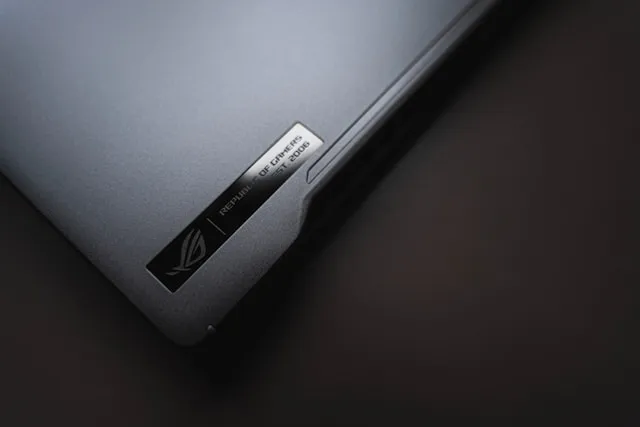
    ASUS ROG Zephyrus G14 - Design
    (Image credit: 昊燃 杨)

    The Zephyrus G14 boasts an elegant Platinum White exterior that complements its sleek and compact frame, measuring 12.24 x 8.66 x 0.64 inches. Weighing only 3.31 pounds, this gaming laptop perfectly balances portability and durability.

    The build quality is reinforced by a sturdy magnesium alloy chassis, making it strong enough to handle everyday wear and tear. With its chiclet-style keyboard that features 1-zone RGB backlighting, typing is precise and comfortable, even in low-light conditions.

    However, we noticed that the Platinum White color could be prone to fingerprints. Additionally, the hinge design might cause slight wobble when gaming on your lap.

    Check Amazon

    Customer Reviews

    Let us dive into customer reviews for the ASUS ROG Zephyrus G14. Users love the powerful AMD Ryzen 9 8945HS processor, combined with the 16GB RAM, and the NVIDIA GeForce RTX 4060 graphics card. This gaming laptop delivers exceptional performance for its size. The 14″ 120Hz OLED screen offers crisp, clear visuals, and the 1TB NVMe SSD allows for quick data access and plenty of storage.

    Customers have mentioned a few drawbacks, however. Some reported issues with heat management and loud fan noise during intensive gaming sessions. Additionally, some users noticed that despite the Windows 11 operating system, updates can occasionally be problematic.

    Conclusion

    After examining the ASUS ROG Zephyrus G14, we can confidently say that this gaming laptop offers excellent performance and features. Its AMD Ryzen 9 8945HS processor, 16GB RAM, and NVIDIA GeForce RTX 4060 provide an exceptional gaming experience. Moreover, the 14″ 120Hz OLED display adds a high level of visual enjoyment.

    Check Amazon

    How does the performance of the ROG Zephyrus G14 compare to other gaming laptops on the market?

    The ROG Zephyrus G14 offers a fantastic performance for its size, thanks to its AMD Ryzen 9 8945HS processor and NVIDIA GeForce RTX 4060 graphics card. This combination allows for smooth gaming experiences at high settings, even while playing demanding titles. While it may not have the absolute top numbers compared to some larger gaming laptops, the G14’s performance is impressive and widely considered to be a top pick for those seeking a balance between power and portability.

    Can the battery life of the ROG Zephyrus G14 handle intensive gaming sessions?

    The ROG Zephyrus G14 comes equipped with a 73WHrs, 4-cell Li-ion battery. While the battery life is generally strong for everyday tasks, intensive gaming sessions will see it deplete faster. For extended gaming sessions, it’s recommended to have the laptop plugged into a power source to ensure optimal performance.

    What are the thermal management features of the ASUS ROG Zephyrus G14?

    ASUS has implemented dedicated thermal management features for the ROG Zephyrus G14 to ensure stable performance during intensive tasks. These features include the unique ErgoLift hinge design for better airflow, an intelligent cooling system with multiple heat pipes, and self-cleaning fans to reduce dust buildup. Together, these features help maintain an efficient thermal environment and prevent overheating during intense gaming sessions.

    How does the ASUS ROG Zephyrus G14 balance portability and power for gaming?

    Weighing just 3.31 pounds and measuring 12.24 x 8.66 x 0.64 inches, the ASUS ROG Zephyrus G14 is a highly portable gaming laptop. The compact design does not compromise on power, as it packs high-performance components like the AMD Ryzen 9 8945HS processor and NVIDIA GeForce RTX 4060 graphics card. This balance makes it an excellent choice for gamers who need both performance and portability in a single device.

    What are the display options and quality like on the new ROG Zephyrus G14?

    The ROG Zephyrus G14 features a 14-inch 3K (2880×1800) 120Hz OLED display with a 0.2ms response time, perfect for vivid colors and smooth gaming experiences. The display also covers 100% of the DCI-P3 color gamut, resulting in accurate and vibrant colors — an important aspect for gaming, as well as content creation and media consumption.


    Asus Asus ROG Zephyrus G14 Gaming Gaming Laptop
    Share. Facebook Twitter Pinterest LinkedIn Tumblr Email
    Previous ArticleAge of Empire 2 Codes: How to Gain an Unfair Advantage
    Next Article Did Google Pay Shut Down in the US? Here’s What You Need to Know
    Elena Rivera
    • Website

    Hi there, I'm Elena Rivera, and welcome to Techie Talks. My journey in the tech world started over ten years ago, fueled by curiosity and a drive to make tech more accessible and inclusive. With a background in Computer Science, I've explored various tech realms, from software development to cybersecurity.

    Related Posts

    How to Run Apps as Administrator on Windows 11 (All Methods)
    Guides

    How to Run Apps as Administrator on Windows 11 (All Methods)

    March 20, 2024
    How to change your default browser in Windows 11
    Guides

    How to change your default browser in Windows 11

    March 12, 2024
    Is Your Mac Safe? How to Detect and Remove Viruses Quickly
    Guides

    Is Your Mac Safe? How to Detect and Remove Viruses Quickly

    March 7, 2024
    Add A Comment
    Leave A Reply Cancel Reply

    Top Posts
    Best IPTV Players for Firestick/Android TV

    10 Best IPTV Players for Firestick/Android TV in 2024: Top Picks Revealed

    March 2, 2024125K Views
    5 Best Bottleneck Calculators for PC in 2024

    5 Best Bottleneck Calculators for PC in 2024

    March 1, 2024112K Views
    Spotify Error Code 18

    Effortless Solutions to Fix Spotify Error Code 18: Troubleshoot & Stream Uninterrupted!

    March 6, 2024111K Views
    Stay In Touch
    • Facebook
    • YouTube
    • TikTok
    • WhatsApp
    • Twitter
    • Instagram

    Subscribe to our Newsletter

    Stay updated with all the latest and important news, articles, and deals in the Tech industry.

    Most Popular
    Best IPTV Players for Firestick/Android TV

    10 Best IPTV Players for Firestick/Android TV in 2024: Top Picks Revealed

    March 2, 2024125K Views
    5 Best Bottleneck Calculators for PC in 2024

    5 Best Bottleneck Calculators for PC in 2024

    March 1, 2024112K Views
    Spotify Error Code 18

    Effortless Solutions to Fix Spotify Error Code 18: Troubleshoot & Stream Uninterrupted!

    March 6, 2024111K Views
    Our Picks
    OpenAI strikes major deal with News Corp to boost ChatGPT

    OpenAI strikes major deal with News Corp to boost ChatGPT

    May 23, 2024
    How to Run Apps as Administrator on Windows 11 (All Methods)

    How to Run Apps as Administrator on Windows 11 (All Methods)

    March 20, 2024
    Report: New anti-glare and scratch-resistant display coming to iPhone 17

    Report: New anti-glare and scratch-resistant display coming to iPhone 17

    March 19, 2024

    Subscribe to our Newsletter

    Stay updated with all the latest and important news, articles, and deals in the Tech industry.

    Facebook X (Twitter) Instagram Pinterest
    • Terms of Use
    • Privacy Policy
    • Cookie Policy
    • Copyright
    • Sitemap
    • Contact Us
    © 2026 Techie Talks. All rights reserved. Techie Talks Media Group may earn a commission when you buy through links on our sites.

    Type above and press Enter to search. Press Esc to cancel.